Enterprise-Grade Large-Scale Distributed Video Wall Splicing System
4K Seamless Display • Multiview • Matrix Switching • KVM • RS232 / RS485 / Relay / I/O • Fiber Optic Support
KH7000_Upgrade
Products / Video Wall Processor / AV over IP Central Control Solution
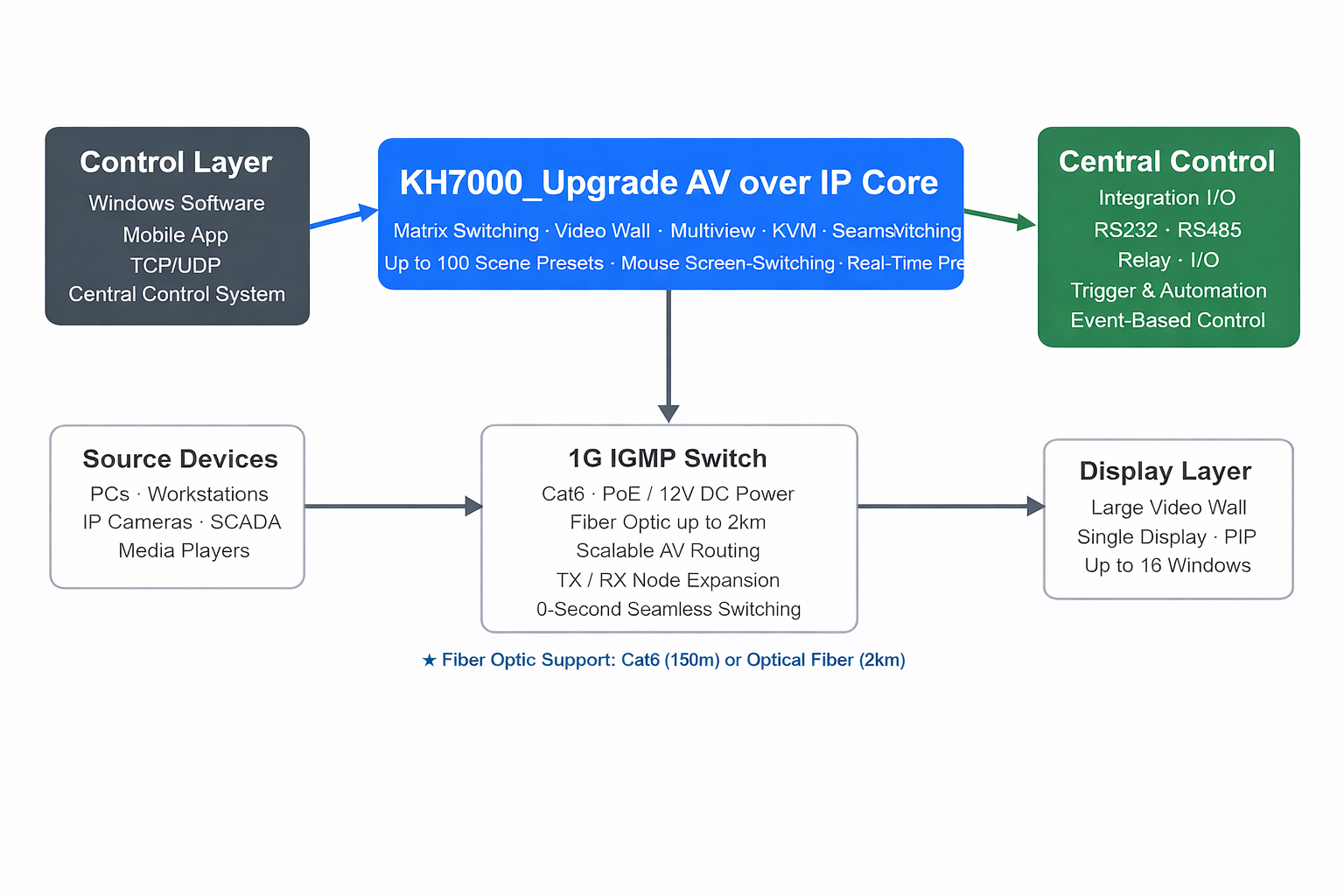
KH7000_Upgrade is an enterprise-grade 4K AV over IP platform engineered for large command centers, security operation rooms, corporate exhibition halls, and campus-wide distributed display networks. Built upon a decentralized architecture, it eliminates the need for a dedicated control processor or central control box — all AV transport, matrix switching, video wall processing, and KVM control are handled across the IP network itself, providing exceptional scalability and deployment flexibility.
Unlike standard AV over IP products limited to copper cabling, KH7000_Upgrade supports both Cat6 Ethernet (up to 150 meters) and fiber optic transmission (up to 2 kilometers via optional SFP modules). This makes it uniquely suited for large industrial parks, multi-floor campuses, or geographically distributed facilities where long cable runs are unavoidable.
KH7000_Upgrade delivers black-screen-free seamless signal transitions, ensuring continuous visual output during source changes. This is essential for live broadcast studios, emergency command rooms, and security monitoring centers where any display interruption is unacceptable. Unlike traditional matrix switchers that introduce blank frames during routing changes, the system maintains uninterrupted display at all times.
The system is equipped with a comprehensive suite of central control integration interfaces — RS232, RS485, Relay, I/O, and TCP/UDP — allowing deep integration with third-party automation systems, building management platforms, industrial control logic, and event-driven triggers. This enables KH7000_Upgrade to respond to external system states, alarms, or scheduled events by automatically recalling display layouts, routing specific signals, or activating relay-controlled devices, all without manual operator intervention.
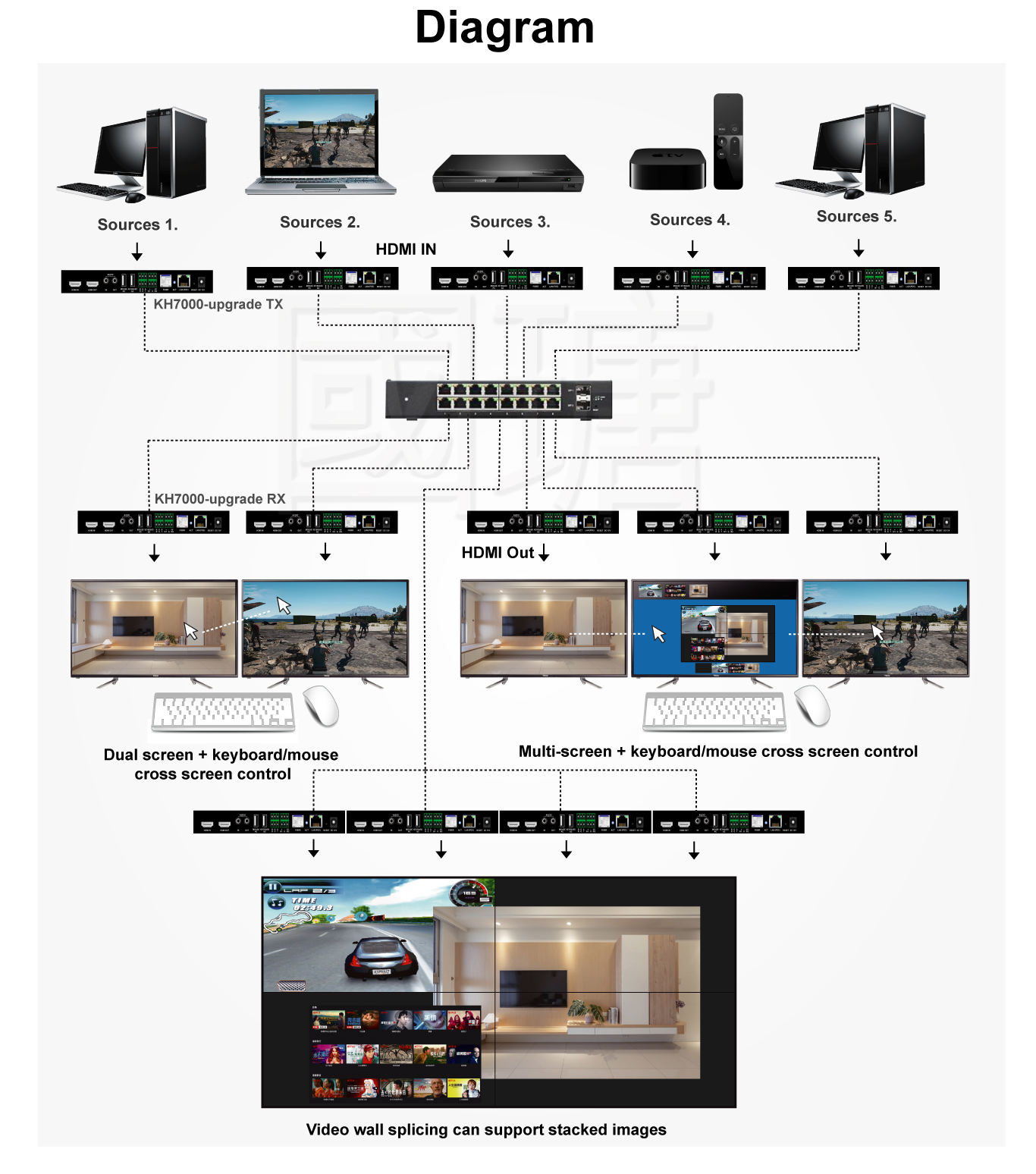
Each connected display can present up to 16 independent signal windows simultaneously, with full support for free resizing, arbitrary positioning, and picture-in-picture overlay. Operators can drag, scale, and arrange windows in real time through the control software, enabling complex monitoring layouts for financial trading floors, security dispatch centers, and multi-data visualization environments without requiring additional external processors.
Beyond standard KVM extension, KH7000_Upgrade supports mouse screen-switching — operators can move the mouse cursor across display boundaries to seamlessly transition keyboard and mouse control between multiple connected host computers. This functionality is especially valuable in IT operation centers, data rooms, and multi-workstation environments where rapid cross-system interaction is a daily operational requirement.
Operators can configure and store up to 100 custom display scene configurations, enabling instant one-click recall for shift handover, incident response, scheduled presentations, emergency protocols, and multi-agency coordination modes. Combined with real-time software preview of all input and output signals, this gives operators both situational awareness and the speed needed in high-pressure dispatch environments.
Built on a 1G IGMP-enabled Gigabit network infrastructure with PoE support, the system can scale from a small single-room deployment to a full enterprise-wide video distribution network by simply adding TX/RX nodes and expanding switch capacity. Each unit supports both PoE and 12V DC power input, simplifying installation in locations without dedicated power outlets and reducing structured cabling complexity.
KH7000_Upgrade provides a complete set of hardware integration interfaces that allow it to communicate bidirectionally with building automation systems, central control processors, industrial PLCs, alarm systems, and event schedulers — without requiring any additional hardware bridge.
Send and receive serial commands to and from third-party central control processors, room control systems, industrial PLCs, and building automation platforms. Both half-duplex RS485 bus communication and point-to-point RS232 are supported, making integration with legacy and modern control hardware straightforward.
The built-in relay interface (±5V) can activate or deactivate connected devices — such as lighting systems, electric screens, signal sirens, or display power switches — directly from within the KH7000_Upgrade control software or in response to predefined event triggers, enabling tight integration with physical control workflows.
The dual I/O interface (IO1/IO2) supports dry contact input signals from external sensors, door contacts, alarm panels, or push buttons. When triggered, the system can automatically recall a stored scene preset, switch signal routing, or execute a predefined control macro — enabling fully hands-free automated display responses.
Issue control commands to KH7000_Upgrade directly over the IP network via TCP or UDP protocol. This allows integration with any networked control system, including Crestron, AMX, Extron, ELAN, custom web dashboards, or in-house automation scripts — providing maximum flexibility for system integrators and enterprise IT operations teams.
Up to 100 custom display scenes can be pre-programmed and triggered by any control interface — serial command, IP network message, I/O contact closure, or software button. This supports automated shift handover routines, incident escalation protocols, scheduled presentation modes, and emergency layout switching without operator input.
The KH7000_Upgrade control software supports a customizable operator interface, allowing system integrators to build project-specific control panels that match the operational workflows of each deployment — from simple one-touch display switching to multi-zone command room orchestration across Windows or mobile platforms.
A side-by-side comparison of conventional matrix-based AV architectures and the KH7000_Upgrade distributed AV over IP approach, covering system design, transmission range, central control integration, scalability, and enterprise deployment characteristics.
| Comparison Item | Traditional AV Matrix System | KH7000_Upgrade Distributed Solution |
|---|---|---|
| System Architecture | Centralized matrix switcher with all signals physically routed to a single chassis. Expansion requires upgrading or replacing the core matrix unit. | Fully distributed AV over IP architecture. TX/RX nodes are added as needed across the network without replacing any core hardware. |
| Transmission Distance | HDMI matrix typically limited to under 15 meters without active extenders. Long-distance runs require costly signal extenders at each port. | Cat6 supports up to 150 meters. Optional fiber optic modules extend transmission to 2km, ideal for large campuses and industrial facilities. |
| Signal Switching | Switching transitions often introduce a brief black screen or signal loss, which is disruptive in monitoring and live broadcast environments. | 0-second seamless switching with no black screen or frame interruption, ensuring continuous display for mission-critical operations. |
| Central Control Integration | Integration with automation systems typically requires an external control processor and custom programming, adding cost and complexity. | Built-in RS232, RS485, Relay, I/O, and TCP/UDP interfaces enable direct connection to automation platforms, PLCs, and building management systems without extra hardware. |
| Video Wall & Multiview | Multiview and video wall functions usually require dedicated video wall processors as separate hardware units, increasing cost and cable complexity. | Matrix switching, video wall processing, and up to 16-window multiview are all handled within the same distributed platform — no additional processors required. |
| KVM Capability | KVM switching is typically a separate system requiring additional switches, cabling, and hardware at each workstation position. | Integrated KVM extension with mouse screen-switching allows operators to control multiple remote hosts from a single keyboard and mouse over the existing IP network. |
| Cabling Infrastructure | Parallel HDMI, audio, serial, and power cabling creates complex, high-density cable runs — especially challenging in large installations. | A single Cat6 or fiber backbone carries AV, KVM, audio, and control signals. PoE eliminates the need for separate power cabling at each node. |
| Scene & Preset Management | Switching to different display configurations typically requires manual re-routing or custom programming in the control processor. | Up to 100 fully customizable scene presets can be stored and recalled instantly by any control interface — software, serial, IP command, or I/O trigger. |
| Scalability | Scaling requires purchasing a larger matrix chassis or deploying a second unit with complex inter-chassis routing, often involving service downtime. | Add TX/RX nodes and expand the network switch as the system grows. No changes to existing infrastructure or downtime are required. |
| Reliability & Redundancy | A matrix switcher failure affects all routed signals simultaneously. Replacement requires full system downtime and reconfiguration. | Distributed architecture eliminates single points of failure. Individual TX/RX units can be replaced without interrupting other signal paths across the network. |
| Total Deployment Cost | High initial hardware cost for large matrix units, plus separate costs for extenders, multiview processors, KVM switches, and control processors. | Consolidates matrix, video wall, multiview, KVM, and control integration in one platform — significantly reducing total hardware and installation cost for large deployments. |
| KH7000_Upgrade | Parameter Details |
|---|---|
| System Positioning | Enterprise-grade 4K AV over IP distributed video wall splicing system for matrix switching, video wall, multiview, KVM extension, and central control integration |
| AV Inputs | 1 × HDMI 1.4b, 1 × 3.5mm Audio Input |
| AV Outputs | 1 × HDMI 1.4b, 1 × 3.5mm Audio Output |
| Mouse Port | Transmitter mode: Connect to host PC; Receiver mode: Connect to control mouse |
| Keyboard Port | Transmitter mode: Unused; Receiver mode: Connect to control keyboard |
| Video Standards | HDMI 1.4b, HDCP 1.4 |
| Maximum Resolution | 3840 × 2160 @ 30Hz (4K); backward compatible with all standard resolutions |
| Core Operating Modes | 1-to-1 extension, 1-to-many distribution, many-to-many matrix switching, video wall splicing, multiview overlay |
| Signal Switching | 0-second seamless switching (no black screen or display interruption) |
| Multiview Capability | Up to 16 independent signal source windows per display; supports free scaling, drag-and-drop, and PIP overlay |
| Transmission Distance | Up to 150 meters over Cat6 Ethernet cable; up to 2km via optional fiber optic SFP module |
| Network Architecture | 1 × RJ45 port, PoE compatible; recommended 1G IGMP-enabled Gigabit switch with PoE support |
| Central Control Interfaces | 1 × RS-485 (BGA) Phoenix terminal, 1 × RS-232 (RGT) Phoenix terminal, 1 × Relay (±5V) Phoenix terminal, 1 × I/O (IO1/IO2) Phoenix terminal |
| Software Control Interfaces | Windows PC software, Android/iOS mobile app, third-party TCP/UDP network commands, customizable control UI |
| KVM & Audio | Keyboard and mouse USB transmission; mouse screen-switching for cross-display host control; analog audio input/output plus HDMI-embedded audio; independent audio de-embedding output |
| Operational Features | Real-time signal preview, 100 scene presets with one-click recall, OSD and scroll text, EDID management, customizable operator UI, encoder/decoder software role switching |
| Power Supply | 12V DC input or standard PoE (IEEE 802.3af compliant) |
| Power Consumption | 10W typical |
| Dimensions | 193 × 100.5 × 25 mm |
| Net Weight | 525 g |